gRPC Inference Endpoints
General Inference can serve your container over HTTP (the default) or gRPC. gRPC runs over HTTP/2 and exchanges binary Protocol Buffers, which makes it a good fit for low-latency, high-throughput, or streaming inference workloads. We use vLLM as the example throughout this guide, deploying its gRPC server end to end.
How gRPC works on CCluster
When you select gRPC as the protocol, a few things differ from an HTTP deployment:
- Container port — set it to the port your container serves gRPC on. For vLLM this is
50051, its default gRPC port. - Health checks — CCluster verifies readiness with a TCP socket check on the container port, so the Health check path field is ignored.
- External access — like every deployment, the endpoint is exposed on port 443 with TLS enforced. CCluster's ingress terminates TLS on 443 and forwards traffic to your container's internal port. Clients connect to
<endpoint_url>:443.
The container port (e.g. 50051) is used only inside the cluster. Externally your endpoint always answers on 443, so gRPC clients should target <endpoint_url>:443, not the container port.
1. Configure the deployment
From the General Inference deployment page, fill in the basic details:
- Add or Select Image —
vllm/vllm-openai. - Container Tag —
latest. - Container Port —
50051(vLLM's default gRPC port). - Protocol — select
gRPC. - Hugging Face Token — include one if your model is gated.
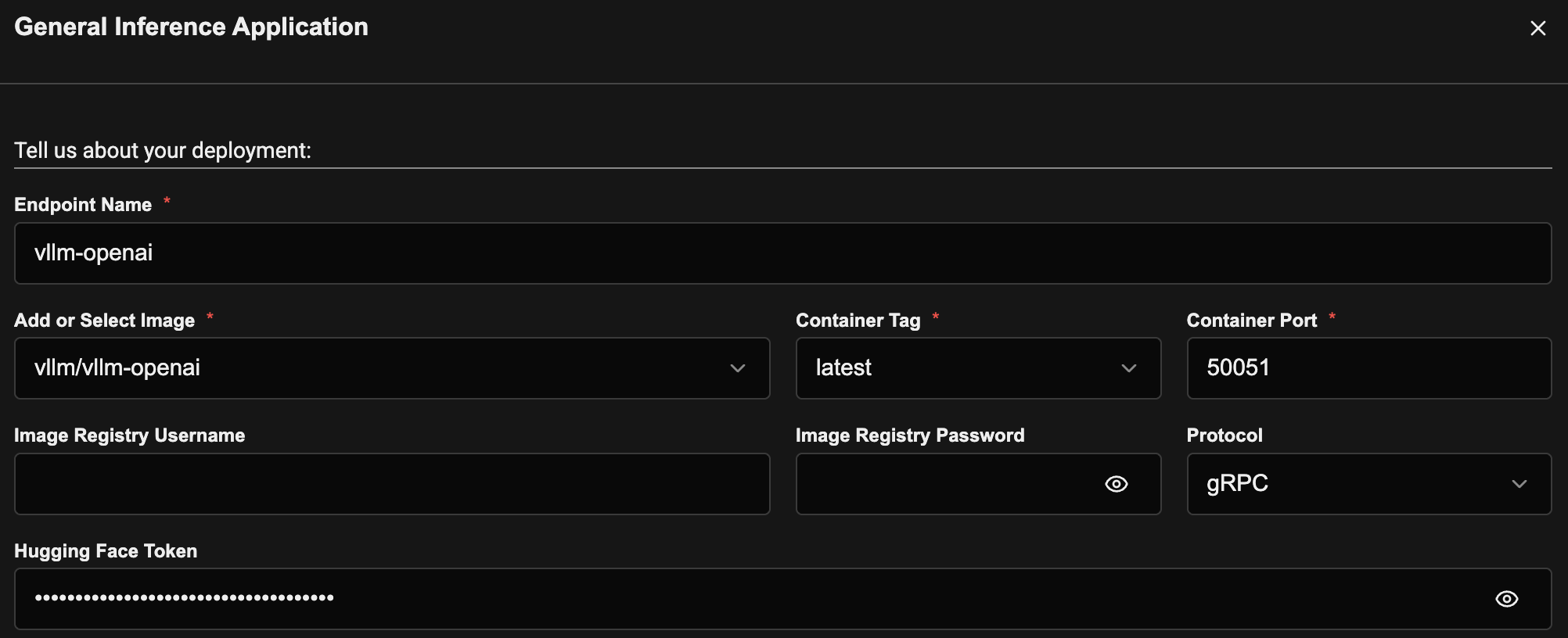
This guide uses the pre-built vllm/vllm-openai image. To package and deploy your own gRPC container, see Deploying Custom Models.
Use a config-file startup script
The vllm/vllm-openai image does not bundle the gRPC extra, so startup is two steps: install vllm[grpc], then launch the gRPC server. Put both in a startup script defined as a Config File and invoke it from Add command.
Keeping Add command to a simple script invocation is also the recommended pattern — commands with special characters (., ,, [], and the like) placed directly in Add command can currently fail to deploy. This is a known issue CCluster is addressing.
Under Optional Details → Config File:
- Filename —
entry.sh - Mount Path (directory) —
/etc/start - File Content:
python3 -m pip install -q --root-user-action=ignore vllm[grpc]
python3 -m vllm.entrypoints.grpc_server --model meta-llama/Llama-2-7b-hf
The file is mounted at <mount path>/<filename>, so set Add command to run it:
/bin/sh /etc/start/entry.sh
![Config File entry.sh installing vllm[grpc] and launching the gRPC server, invoked from Add command](/images/grpc_vllm_entry_script.png)
Every endpoint is protected — there are no public endpoints. Secure access with a Bearer token, an mTLS client certificate, or both. For mTLS, select Make it a private endpoint? and CCluster generates a TLS certificate that clients must present. See Securing Endpoints for details.
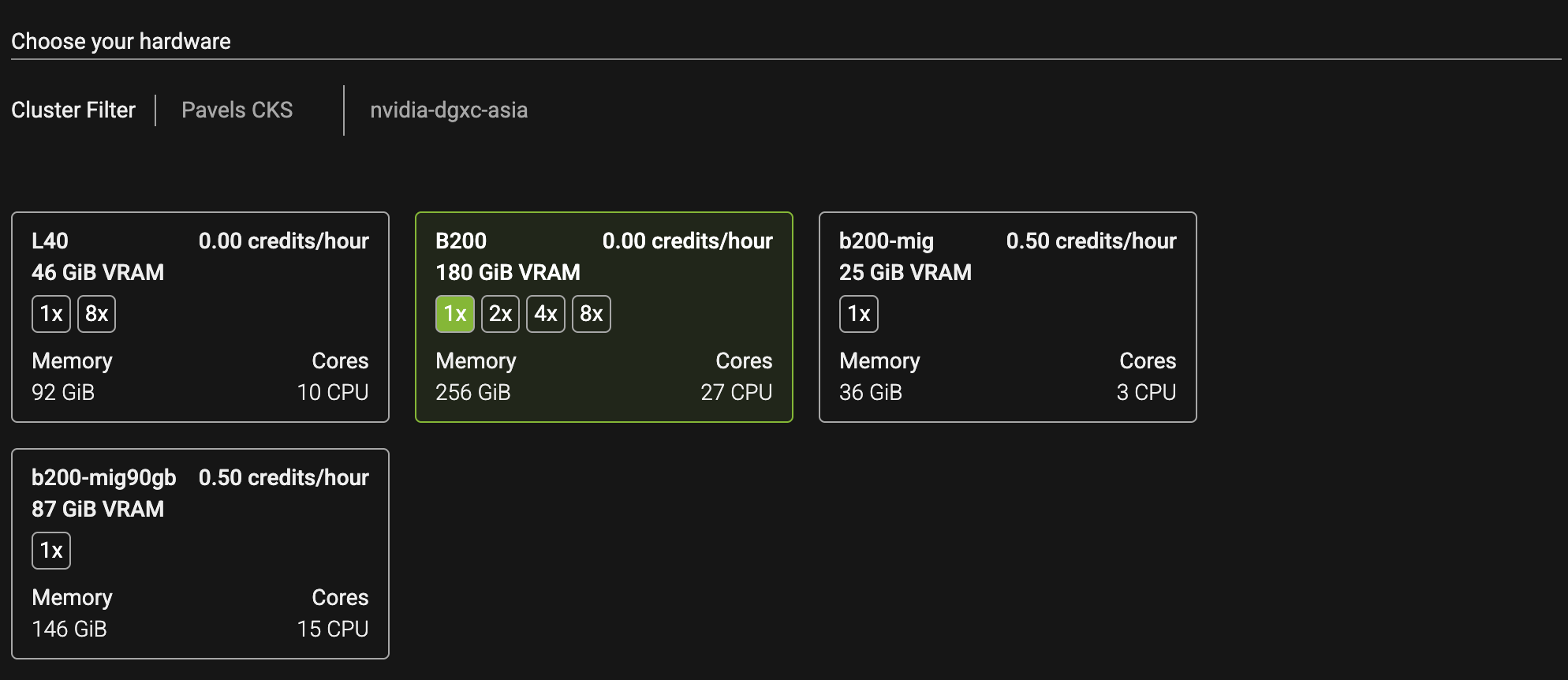
2. Select the cluster and hardware
Choose the cluster and GPU instance that match your model and setup, then click Deploy.
3. Call your gRPC endpoint
Once the deployment is Ready, its endpoint URL appears on the deployment's Detail page under Endpoint Configuration, alongside the protocol (gRPC). Clients connect to this host at <endpoint_url>:443 over TLS. Because CCluster terminates TLS on 443, point your gRPC client there with TLS enabled (for grpcurl, that means omitting -plaintext).
vLLM's gRPC server has reflection enabled, so you can list its services with grpcurl:
grpcurl <endpoint_url>:443 list
grpc.health.v1.Health
grpc.reflection.v1alpha.ServerReflection
vllm.grpc.engine.VllmEngine
Check readiness with the standard gRPC health service:
grpcurl <endpoint_url>:443 grpc.health.v1.Health/Check
# {"status": "SERVING"}
Inspect the served model:
grpcurl -d '{}' <endpoint_url>:443 vllm.grpc.engine.VllmEngine/GetModelInfo
Run inference with the server-streaming Generate RPC. The response streams token_ids rather than decoded text — decode them with the tokenizer (the GetTokenizer RPC) or see the vLLM documentation for the full request and response schema:
grpcurl -d '{"request_id": "1", "text": "The capital of France is", "sampling_params": {"temperature": 0.7, "max_tokens": 16}, "stream": true}' \
  <endpoint_url>:443 vllm.grpc.engine.VllmEngine/Generate
Endpoints are protected, so authenticate every call — pass a Bearer token, or for an mTLS endpoint pass the downloaded certificate to your client (for grpcurl, use -cert / -key). See Securing Endpoints.