NVIDIA Dynamo
NVIDIA Dynamo deployments are backed by a Dynamo Frontend and GPU-powered vLLM workers. HTTP deployments expose an OpenAI-compatible API, while gRPC deployments expose the KServe v2 inference protocol. NVIDIA CCluster manages the Dynamo runtime, deployment lifecycle, TLS ingress, revisions, scaling configuration, status, and logs.
NVIDIA Dynamo support is currently in beta. It is available only on clusters where the Dynamo operator is enabled. If Dynamo is not available when you create a deployment, request support.
The integration supports two serving topologies:
- Aggregated — each Worker performs both prompt processing and token generation. Aggregated Workers can use a fixed replica count or autoscale within a configured range.
- Disaggregated — separate Prefill and Decode pools perform prompt processing and token generation. The Frontend routes work between the pools, and Prefill transfers KV state to Decode. These pools currently use fixed replica counts.
Both topologies use one CPU-only Frontend. Every GPU worker replica consumes one complete instance of its selected hardware type. NVIDIA CCluster supplies the Dynamo runtime image, so you select the model and hardware instead of providing a container image.
Before you begin
Prepare the following:
- A Hugging Face model identifier, such as
Qwen/Qwen3-0.6B. - Access to the model on Hugging Face. For gated or private models, accept the model license and provide a Hugging Face token that can download it.
- A Bearer token or client certificate for endpoint authentication. Public, unauthenticated endpoints are not supported.
- Enough GPU quota and cluster capacity for either the maximum aggregated Worker count or the combined fixed Prefill and Decode pools.
1. Configure the endpoint
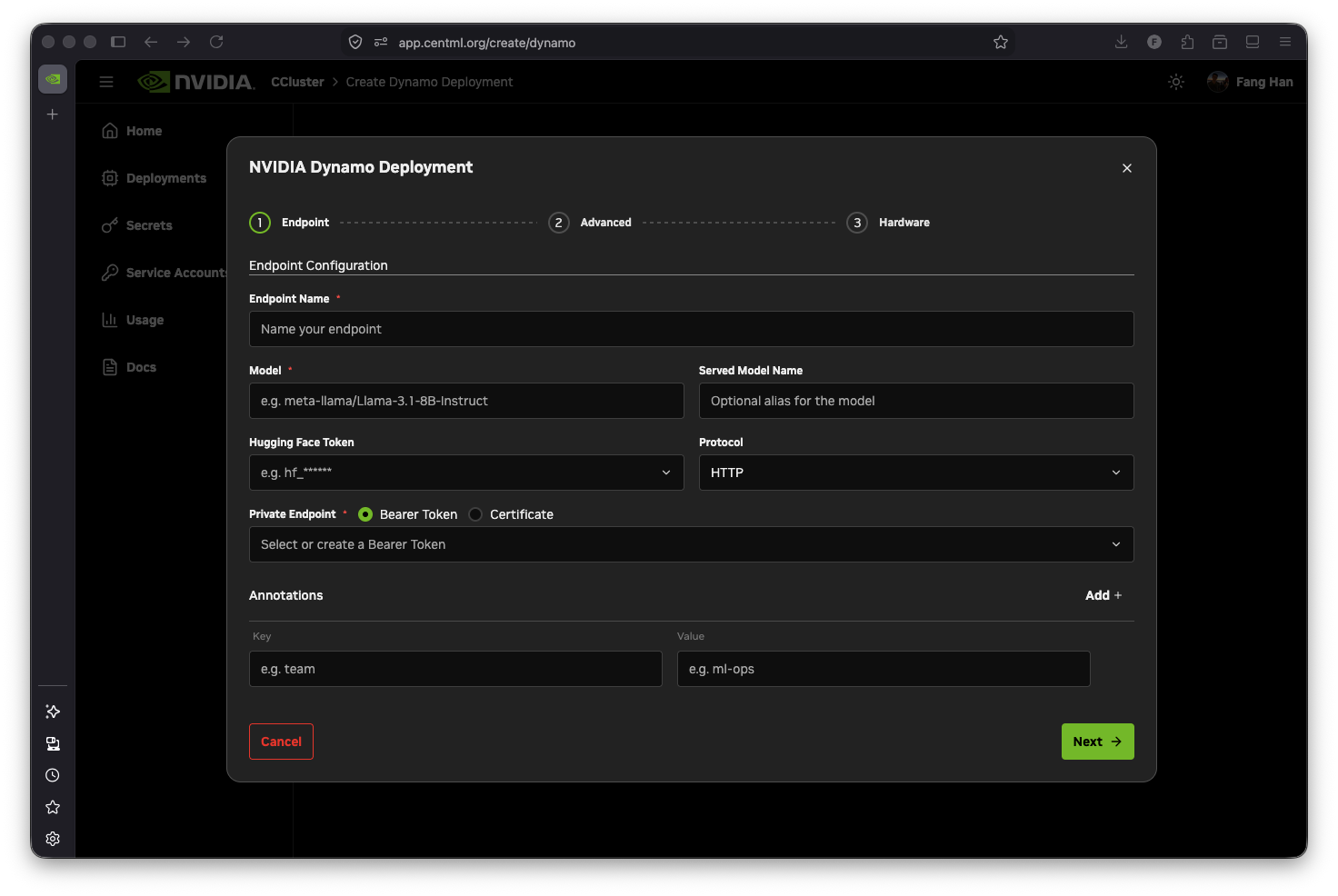
From New Deployment, choose Dynamo. The Endpoint step contains the required serving settings:
- Endpoint Name — a unique name containing lowercase letters, numbers, and hyphens. It must begin with a lowercase letter, end with a letter or number, and be no more than 20 characters.
- Model — the Hugging Face model identifier loaded by the vLLM workers.
- Served Model Name — an optional alias clients can send in the OpenAI
modelfield. If you leave it empty, use the Hugging Face model identifier. - Hugging Face Token — required for gated and private models.
- Protocol —
HTTPfor the OpenAI-compatible API orgRPCfor the KServe v2 inference protocol. - Private Endpoint — select or create a Bearer token or client certificate.
- Annotations — optional key/value metadata applied to the deployment components.
For Bearer token and mTLS setup, see Securing Endpoints. Do not place endpoint credentials in environment variables.
2. Configure runtime options
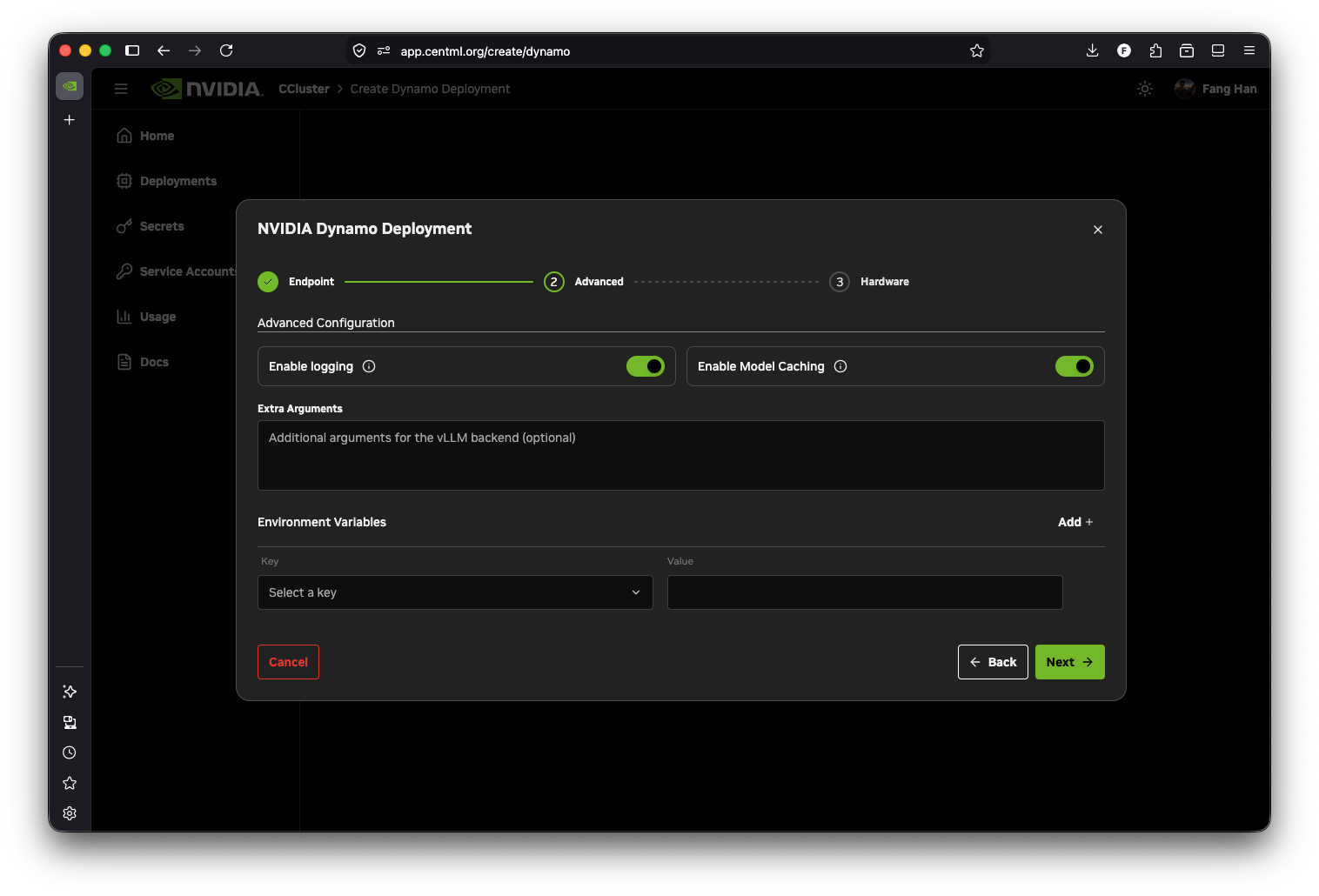
The Advanced step includes optional runtime and observability settings:
- Enable logging — enabled by default. Container output is collected and displayed in the deployment's Logs tab.
- Enable Model Caching — stores model files in a node-local persistent cache. Restarts and replicas scheduled on the same node can reuse the files instead of downloading them again.
- Extra Arguments — additional vLLM worker arguments. During the beta, use this field only when directed by NVIDIA CCluster support; an unsupported value can prevent the worker from starting.
- Environment Variables — additional variables passed to the Frontend and workers. Use shell-compatible names containing letters, numbers, and underscores, beginning with a letter or underscore.
3. Select hardware and scaling for aggregated serving
The current console workflow creates aggregated deployments. In the Hardware step, choose a cluster and GPU hardware type. The selection applies to each Worker replica: for example, if the selected hardware is 8 x H100, every Worker uses one 8 x H100 instance.
Configure the worker count with these fields:
| Setting | Description |
|---|---|
| Min Replicas | Minimum number of GPU worker replicas. Must be at least 1; Dynamo deployments cannot scale to zero. |
| Max Replicas | Maximum number of GPU worker replicas. Set it equal to Min Replicas for a fixed-size deployment. |
| Concurrency | Target number of active requests per worker used to calculate the desired worker replica count. Required when Max Replicas is greater than Min Replicas. |
| Cooldown Period | Scale-down stabilization time in seconds, from 0 to 3600. |
Set Min Replicas lower than Max Replicas to enable autoscaling. NVIDIA CCluster scales the Worker component within the configured range based on active request concurrency. The worker replica count does not scale below Min Replicas, which must be at least 1.
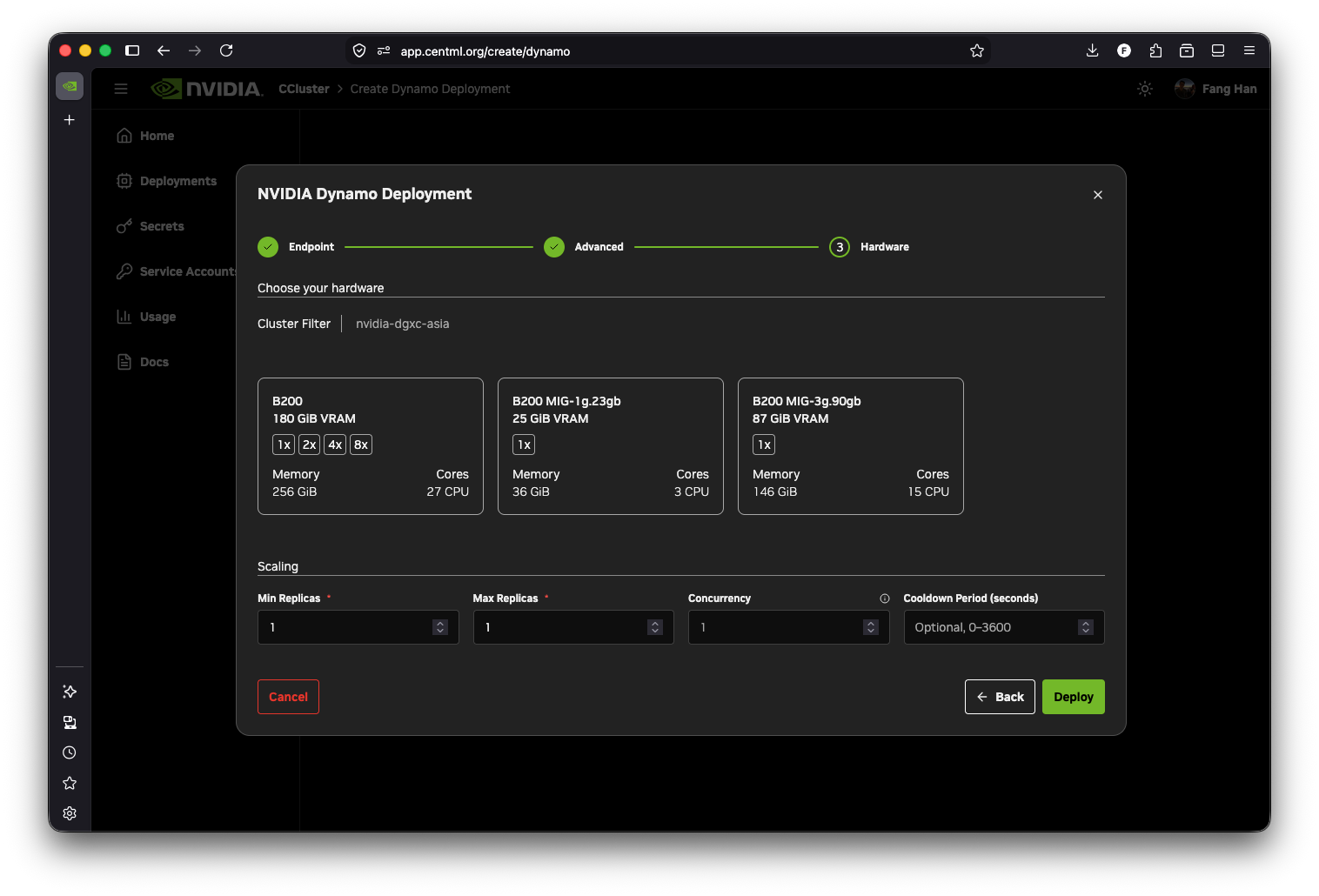
NVIDIA CCluster evaluates GPU quota against Max Replicas. Make sure the cluster has enough capacity to run that many workers, each consuming one complete selected hardware instance. Set Min Replicas equal to Max Replicas for a fixed-size deployment, or set Min Replicas lower than Max Replicas for autoscaling.
Click Deploy. Model download and worker startup can take several minutes, especially for large models that are not already cached.
4. Create a disaggregated deployment with the API
Disaggregated Prefill and Decode serving is available as an API preview. The console does not yet expose topology controls for this mode. Send a POST request to /deployments/dynamo with serving_mode set to disaggregated and define both worker pools:
{
  "name": "dynamo-pd",
  "cluster_id": 123,
  "model": "Qwen/Qwen3-0.6B",
  "serving_mode": "disaggregated",
  "worker_pools": {
    "prefill": {
      "hardware_instance_id": 456,
      "replicas": 1
    },
    "decode": {
      "hardware_instance_id": 789,
      "replicas": 2
    }
  },
  "endpoint_bearer_token": "<endpoint-bearer-token>",
  "enable_logging": true
}
The Prefill and Decode pools can use the same GPU hardware profile or different profiles, but both profiles must be available in the selected cluster. Each pool must have at least one replica. Every replica consumes one complete hardware instance, so the deployment's GPU footprint is the sum of the Prefill and Decode pool footprints.
The endpoint_bearer_token in this request protects the deployed inference endpoint. It is separate from the credential used to authenticate the request to the NVIDIA CCluster API.
Prefill and Decode pools are fixed-size in the current release and do not autoscale independently. Do not include the aggregated fields hardware_instance_id, min_replicas, max_replicas, concurrency, or cooldown_period at the top level of a disaggregated request. Use worker_pools from GET /deployments/dynamo/{deployment_id} as the source of truth for its hardware and replica configuration.
Understand KV transfer transport
NVIDIA CCluster configures NixlConnector on both Prefill and Decode workers. NIXL is the logical KV transfer connector; it does not by itself guarantee that a deployment uses NVLink, CUDA IPC, RDMA, or EFA. NIXL selects an available backend; when it uses UCX, UCX selects the concrete lanes and transports based on the resources visible to both pods and the capabilities provisioned on the cluster.
The current deployment layout uses separate pod IPC namespaces, does not request an RDMA or EFA device, and does not guarantee same-node placement. In a live validation with one Prefill and one Decode pod placed on the same 8×B200 node, UCX reported rma_am(tcp/eth0) and other TCP lanes over eth0; no RDMA or CUDA-IPC lane was selected. The KV transfer completed successfully, but this was a transport correctness check rather than a performance benchmark.
TCP KV transfer adds overhead and can reduce the expected latency or throughput benefit of disaggregated serving. Do not infer the active transport from the GPU model or same-node placement alone. Measure the selected transport on your target cluster before making performance assumptions, and request support if your workload requires an accelerated cross-pod KV path.
With logging enabled, inspect the Prefill and Decode logs for UCX backend and lane output and for KV transfer metrics. Do not force UCX_TLS when establishing a baseline because that override changes transport selection.
5. Monitor the deployment
The deployments list and revision table report Dynamo pods by component instead of combining them into one replica count:
- Frontend — the request-routing component. A standard deployment has one Frontend pod.
- Worker — the GPU-backed vLLM replicas in an aggregated deployment.
- Prefill — the GPU-backed prompt-processing replicas in a disaggregated deployment.
- Decode — the GPU-backed token-generation replicas in a disaggregated deployment.
For example, Frontend (1 / 1 replicas) and Worker (2 / 2 replicas) describe a ready aggregated deployment. Frontend (1 / 1 replicas), Prefill (1 / 1 replicas), and Decode (2 / 2 replicas) describe a ready disaggregated deployment. The overall deployment can remain not ready when the Frontend is unhealthy, even if all workers are running, because the endpoint cannot accept traffic without it.
Open the deployment to access:
- Detail — endpoint, model, hardware, scaling configuration, component health, and revision history. The console does not yet present the complete Prefill and Decode pool configuration; inspect
worker_poolsthroughGET /deployments/dynamo/{deployment_id}when using the API preview. - Logs — logs for a selected component pod and revision. Logs are available only for revisions with logging enabled.
- Terminal — an interactive shell for an active deployment.
- Usage — deployment resource usage.
Changing worker Min Replicas or Max Replicas on a running Dynamo deployment scales in place and does not create a new revision. Editing the spec (model, protocol, extra arguments, and similar) creates a new revision. See Managing Deployments for Terminal, pause/resume, clone, and the shared revision model.
Editing a Dynamo deployment creates a new revision and starts an operator-managed rolling update. You can inspect historical revision status and logs, clone a deployment, or roll back to an earlier revision. Pausing or resuming the whole deployment is supported; pausing only an in-progress Dynamo rollout is not.
The console's Edit and Clone flows currently support aggregated deployments only. For a disaggregated deployment, use the Dynamo API to update supported fields or create a copy from the worker_pools configuration returned by the API.
6. Call the endpoint
For a Bearer-protected HTTP deployment, copy the endpoint hostname and Bearer token from the Detail tab. Send requests to the OpenAI-compatible chat completions endpoint:
curl "https://<endpoint_url>/v1/chat/completions" \
  -H "Authorization: Bearer <your_bearer_token>" \
  -H "Content-Type: application/json" \
  -d '{
    "model": "<model-or-served-model-name>",
    "messages": [
      {
        "role": "user",
        "content": "Explain why low-latency inference matters."
      }
    ],
    "max_tokens": 128,
    "stream": false
  }'
For a certificate-protected endpoint, configure your HTTP client with the downloaded client certificate instead of the Authorization header. See Securing Endpoints.
If you selected gRPC, connect to <endpoint_url>:443 with TLS and use Dynamo's KServe v2 ModelInfer or ModelStreamInfer API. This is different from the direct vLLM gRPC API used by General Inference deployments. See the NVIDIA Dynamo KServe gRPC frontend guide for the protocol and Securing Endpoints for authentication.
Current scope
The beta integration currently supports:
- Aggregated serving with fixed-size Workers or dynamic Worker autoscaling between the configured minimum and maximum replica counts.
- Disaggregated serving with independent, fixed-size Prefill and Decode pools and NIXL KV transfer.
- HTTP OpenAI-compatible and KServe gRPC endpoints.
- Bearer token or mTLS endpoint protection.
- Revision-aware status, logs, and rollback for both topologies, with console editing and cloning for aggregated deployments.
The current integration has a single Frontend and does not expose Frontend high availability, independent Prefill or Decode autoscaling, coordinated or guaranteed same-node placement, a guaranteed NVLink/RDMA/EFA KV path, custom Dynamo runtime images, config-file mounts, or scale-to-zero. Disaggregated creation and complete pool details are currently API-only. For Dynamo architecture and features outside the NVIDIA CCluster integration, see the NVIDIA Dynamo documentation.